 jevieDocs
Download
Talk to Jevie
Voice and dictation
Talk to Jevie or type with your voice in any app: double-tap ⌘ to ask and hear the answer, hold ⌘ to dictate anywhere.
Free, more with ProMacPhoneMicrophone
What it looks likeUse itHow it worksLimitsWhere it's kept
Use it
Ask out loud
- ⌘⌘ (double-tap ⌘)Ask Jevie out loud; the answer is spoken back to you
- Esc while talkingThe conversation ends; work it started keeps running
yes
no
when Jevie asks firstAnswers it, as Allow and Deny douh, set a timer for, um, five minutes
The ums and uhs are not part of the request- tap Jev on the phoneHe listens, answers out loud, then listens again
Hey Jevie
With it turned on, Jevie opens listening without a key;Hey Jevie, what's on my calendar
asks it in one breathturn on hey jevie
turn off hey jevie
Or the switch on the Speech card; off until you turn it on
Dictate anywhere
- hold ⌘ in any text field or terminal, the wall's pages and terminals tooSpeak, let go, and the sentence is written in (dictation starts a little under a second in; on the wall a shorter hold shows the side's letters instead)
add kubernetes to my vocabulary
A word dictation listens for and writes as you spell it- hold ⌘ in Jevie's own fieldLet go and it is sent and answered aloud
- hold Jev on the phoneDictation starts; let go and it keeps listening until you tap Jev again, then the tidied words go in the field to send, heard by your Mac with your vocabulary; while you speak a wave moves in the field where the + was (the field's own words:
Type, hold to dictate, tap to chat
) Monday, uh, no wait, Friday
Lands asFriday
: fillers and corrections cleaned upscratch that
while dictatingDrops the sentence before it
More
transcribe this call
A call written down: you, and themI speak Hindi and English
set my languages to Hindi, English
Jevie hears and answers in your languagesmute Jevie
unmute Jevie
Interface sounds off and back on
How it works
Your voice is heard on this Mac, and Jevie starts on simple, undoable requests like opening an app while you are still talking, so the answer is ready when you stop. Jev rises and lights as you speak and stays at the screen's edge while Jevie works, so you can watch what it does; Esc ends the conversation, and nothing is shown in the notch.
When Claude is your agent, a request you say out loud (⌘⌘, or a held ⌘ in Jevie's own field) is answered at once with one short line, Let me check the markets for you
, while the work runs. The line comes from Claude Haiku on your own Claude login, already started while you were speaking, about a second after you stop, in Jev's own voice. It only says what Jevie is about to do.
It never gives an answer or a figure, and a line that tries is not said. The answer follows it, and a short confirmation such as Opened Fox News
is not said a second time. When the answer is ready before the line, there is no line.
Work that takes longer, such as research Claude Code does for you, is told as it goes while the conversation is up: Searching for best rated ramen San Francisco
, Reading theinfatuation.com
, then what it found when it ends. A step is said at most every seven seconds and never over other speech. Steps that say nothing, like Running a command
, stay on screen only.
You can talk over Jev. While he speaks in a conversation, Jevie keeps listening. When you say something he is not saying, he stops mid-word and what you said becomes your next request: stop
, or no, open CNN instead
.
With headphones any words cut in at once. On speakers, his own voice coming back through the microphone is recognised by its words and ignored, so you need two words of your own, or a word like stop
, wait
or no
. What he had said before you cut in is what the conversation remembers.
With Hey Jevie
on, the Mac keeps listening while Jevie is closed, for that phrase alone. Its voice detector wakes the recogniser only when someone speaks, and each stretch of speech is heard for its first two or three seconds; one that does not begin with Hey Jevie
is let go there, unwritten and unsent. When it does, Jevie opens as ⌘⌘ opens it, and anything said after the phrase in the same breath is asked straight away.
The Speech card reads your languages and says who hears each and who answers it, then offers one button, Set up (your languages), that fetches only what they need: Parakeet for a European language, Omnilingual for one the Mac does not hear, Jev's voice for English and his voice in other languages for the thirty it speaks. Each is fetched once, checked, and kept on this Mac.
Dictation gathers your words in a small capsule by the cursor and writes the finished, tidied sentence when you let go. An answer with more to read than was said stays as a chip and at the top of home until you clear it, on every device.
Limits
- The first line said out loud is only on the Mac, only with Claude as your agent and signed in, and each one counts against your Claude plan's usage like any other Claude turn.
JEVIE_VOICE_FRONT=0turns it off. A Jevie you built yourself says it in the Mac's voice rather than Jev's. - To keep work silent, run
defaults write com.jevie.Jevie voiceNarration -bool false. - Cutting in is Mac only. On speakers, a request made only of words Jev was saying (
open the portfolio
while he saysloading your portfolio
) is taken as his own echo; say it again once he stops.defaults write com.jevie.Jevie bargeIn -bool falsepauses the microphone while he speaks, as before.
- Nothing you say on the Mac leaves it to be transcribed; on the phone without a Mac, Care is heard by Jevie Cloud.
- Dictation writes when you let go (on the phone, when you tap Jev again), never while you speak; a password field gets a copy to paste instead.
- For a minute or two after Jevie is updated, Parakeet is being prepared for this Mac's Neural Engine: dictation works meanwhile, heard by the Mac's own recogniser, and Parakeet takes over once it is ready. If dictation could not start before you let go, the capsule says so at once (
missed that
); hold ⌘ and say it again. - A word or two caught in a conversation that is no request (
ne
) is let go: Jevie says it did not sound like a request and does nothing, rather than asking what you want done. A short command (dark mode
,next
) and talk (thank you
) still answer. Hey Jevie
keeps the microphone open while it listens (macOS shows the orange dot) and uses about 1% of one core in a quiet room. It stops listening while you hold ⌘, while Jevie is speaking, and while the screen is locked or asleep. It is English only, the Mac only, and heard asHey
orHi
and then the name; a request that runs on past its first few seconds without the phrase is not heard.- Jevie hears the languages your Mac is set to (System Settings → General → Language & Region) until you name yours. Parakeet hears 25 European languages; the Mac's own recogniser hears a language whose dictation is on this Mac; Omnilingual (350 MB, offered on the Speech card) hears 1,648 more, Hindi, Thai, Swahili, Persian, Bengali, Tagalog and Yoruba among them, in their own scripts. It writes lower case without punctuation, and its words are less sure than Parakeet's: on read news about one character in six is wrong in the median language (one in twenty for Parakeet's), and Bengali, Odia, Urdu and Malayalam are heard worst. A language none of them knows (Scottish Gaelic, Romansh, Tongan, Sanskrit) is not heard; type it.
- Jev answers in his own voice in English and 30 more languages once his voice for them is fetched (Supertonic-3, about 160 MB on the Speech card): Arabic, Hindi, Russian, Japanese, Korean, Vietnamese, Turkish, Indonesian and most European languages. Chinese, Thai, Hebrew, Malay, Catalan and Norwegian are said in the Mac's voice. Any other language is shown, not said: no voice on the Mac speaks it.
- Figures are said as words by Jev's own voice wherever it runs: in the Mac app, and in the page on Windows, Linux, a browser and the phone (the same rules,
spokenFigures.ts). The system voice reads them as written, and so does Jev's voice when the phone has the Mac read an answer for it. Some names come back spelled another way even when said right (Siobhan
heard asShivon
). - On Windows the keys are Alt: Alt Alt talks, hold Alt dictates. There is no notch, so the conversation rests as a small pill at the top centre of the screen; the caret is found with UI Automation, and the sentence is pasted into the field. Jevie's voice gives no word timings there, so the answer's words appear at its usual pace. Dictation's names come from your repositories, their committers and what you write to coding agents (no Contacts). Parakeet hears you there on the CPU (ONNX), offered on the Speech card as on the Mac; answers in English are said in Jev's own voice in the window, other languages in the Windows voice. Windows gives desktop apps the microphone with two switches under Settings › Privacy & security › Microphone (
Microphone access
andLet desktop apps access your microphone
): with either off, or a microphone that sends only silence, Jevie says so instead of listening to nothing.
Where it's kept
~/.jevie/speech.json, ~/.jevie/vocabulary.json, ~/.jevie/dictations.json.
What it looks like
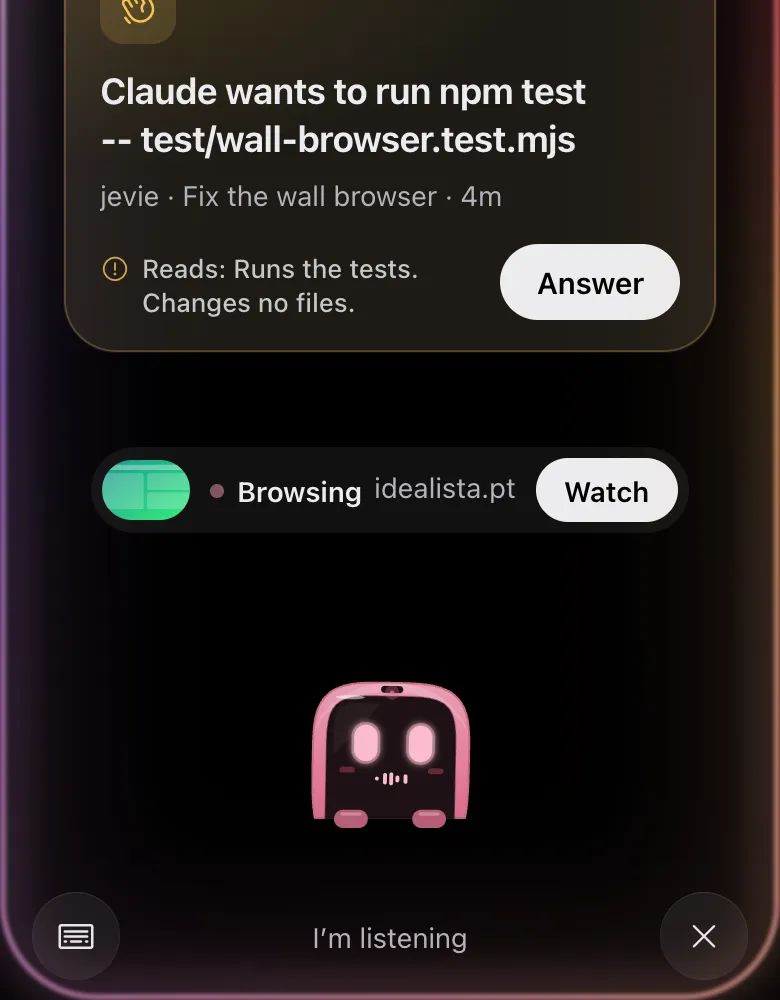
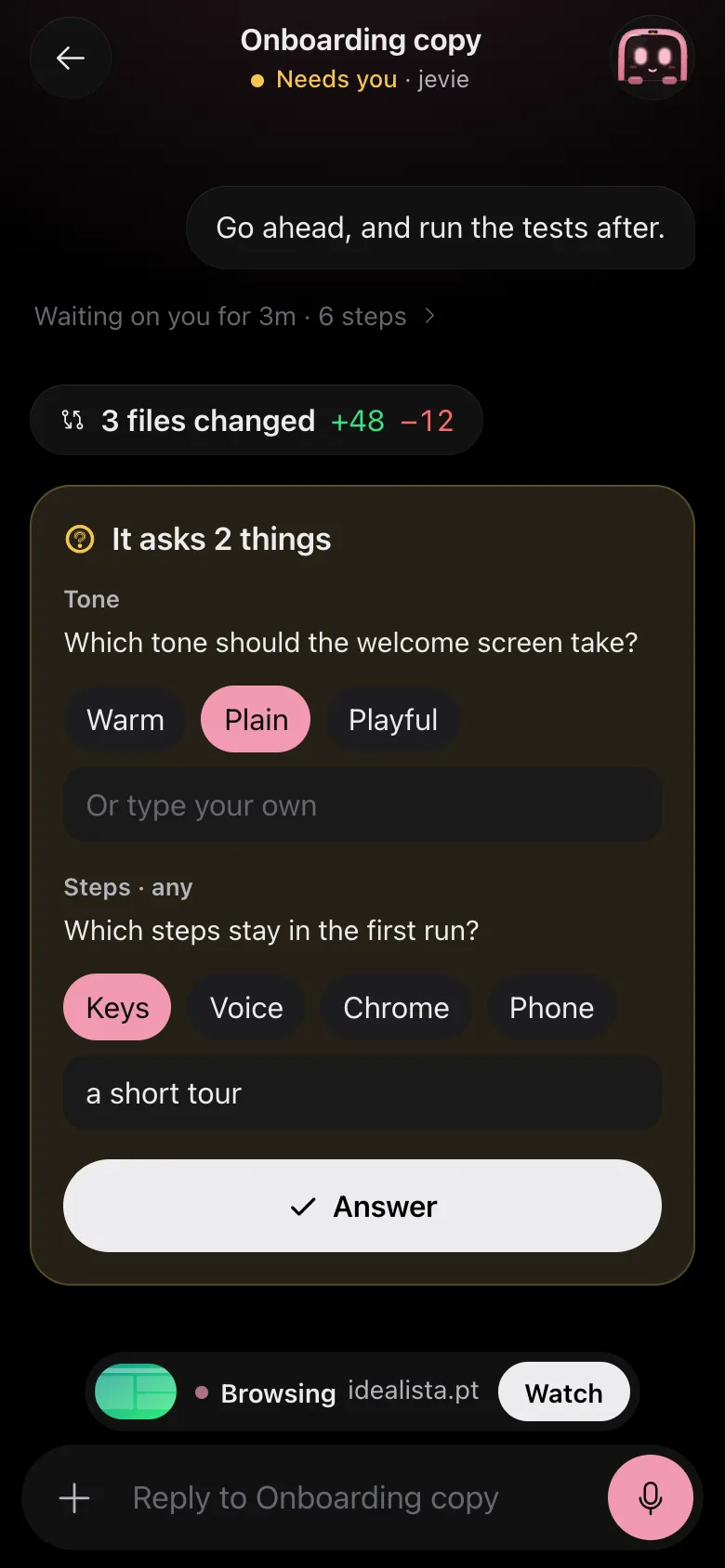
Drawn by Jevie's own renderer with made-up data.
In Jevie, help languages i speak
answers from this page as you type.
Related
Updated 9 November 2026 · Something wrong or missing? Tell us