 jevieDocs
Download
Your coding agents
Coding-agent sessions
See and steer every coding agent you run, Claude Code, Codex and the rest, from one place: what each is doing, which need you, and their questions answered from anywhere.
FreeMacPhoneCoding agent
What it looks likeUse itHow it worksLimitsWhere it's kept
Use it
See them all
sessions
sessions board
Every live and recent session, those asking you first, or as a boardwhat's Claude doing in jevie
What each session at work is doing, one line each; the finished ones only when none is at work, the latest threewhat was the session about raycast
Found by what was said in itai usage
claude ai usage
ai usage codex
codex limits
One card (an agent named: that agent alone), drawn under the field as you type it (as weather is): Claude's five-hour and weekly windows and Codex's, each a bar with how much is used and when it resets; Gemini CLI, OpenCode and pi by their last seven days. A window being used faster than it lasts also says when it runs out at that rate (runs out in 45m · resets in 2h
), once a tenth of it has gone bywhich sessions changed gate.mjs
which agent edited kernel/gate.mjs
ai history of this file
The Claude Code and Codex sessions of the last 30 days that edited that file, newest first: edits, lines added and taken out, how long ago, the folder and the prompt behind the last edit; ↵ on one resumes it. A name or the end of a path matches any file ending in it (sessions in temporary folders left out);this file
is the one in focus. Read from~/.claude/projectsand~/.codex/sessionsin code, a few seconds for a month, nothing kept or sentstudio
jevie studio
(orsession wall
, its name before)Jevie Studio: every running session in one window, with two views. The Desk reads each session as its conversation and answers it (open the desk
, ⇧⌘O); the Terminal tiles them, the newest biggest (studio terminal
, ⇧⌘O again).desk
alone is Studio's; a desk you saved by name (open the work desk
) is still that deskstudio
with nothing runningStudio says No Sessions, Jevie sorry for it, with Create Session (or Return): pick a folder (recent and open projects first, type to search, → walks into one) and the agent starts there as a tile; its first row, Agent, changes which agent starts (Claude, Codex, … or Shell), kept for next time. Esc or ⌘W closes it- Jevie Studio's first open (from a sentence, or Jevie Studio in Applications) is its setup, three steps on one card. Connect: this Mac, the computers linked to it and those on your tailnet, each Online or Offline; paste another computer's link code and Link, or
Need a link code?
shows this Mac's code to say there. Agents: each coding agent installed, Ready with the account it signed in with, or Sign In, which starts it in a terminal so it asks for its own sign-in (Jevie never signs in for it); the row you press is the one Create Session starts;Add another agent
lists the rest with their install command. Projects: the repositories your agents worked in this month, with sessions, which agents and when; picked ones come first when you start a session. Its last button starts your agent in your first project; Done finishes without starting; × skips it for good, Esc closes Studio and it is offered again. ⇧⌘PSet Up Jevie Studio…
opens it any time - ⌘= and ⌘- in StudioEvery terminal on it grows or shrinks together as you press, the text reflowed at once, and the size is kept for the tiles that come later and next time (9 to 28 pt). A page in hand zooms itself instead. ⇧⌘= and ⇧⌘- give the tile in hand more or less room
- ⌘B in StudioThe side: every pane in Studio down the left, as the phone's Work list: Pinned, Needs you (only a session asking you something), Working and Recent (done, failed and idle sessions; one not yet looked at keeps its dot), each with its count at the right, then Pages and Shells, and last Archived: the Claude sessions that ended in the last month, folded every time. Click its header to list them (newest first, how long ago each ended at the right) and click one, or Return on it, to resume it in Studio; folded again, the list is let go. An agent's row is the phone's: its mark and state,
Title · folder
, what it is doing or last said, then its goal or how long it worked, and its time at the right (the working one counting up); the one in hand shows its last turn's pictures. Rest the pointer on a row with pictures and they open beside the side, as wide as the screen leaves room for: the newest large, every one in a strip across the foot. Move onto them and they stay; a picture in the strip under the pointer shows large, a click keeps it there, and a double click opens its file. A header click folds its section. A shell shows what it runs (top, vim, node). Along the side's top, as on the phone's Work, a chip per status with its count (Needs you, Working, Done, Failed, Idle): one pressed lists only those, pressed again every pane; ⌃⌘1 to ⌃⌘5 do the same (⌘. is Needs you), ⌃⌘0 lists every pane, and ⌃⌘B folds the strip away and back, the keys working either way. ⌥⌘1 to ⌥⌘0 lay Studio out as Grid, Columns, Rows, Main left, Main right, Main top, Main middle, Split, Full or Chain (⌘\ steps through them). ⌘/ lists every key. ⌘1-9 go to that row. Hold ⌘ alone in Studio and after a moment each row in the side shows a letter; still holding ⌘, press the letter and that session is in front (two letters when there are many). The first key decides: a shortcut pressed quickly (⌘J ⌘J ⌘J) is the shortcut, and a letter pressed once the letters show goes to that row; let go, Esc or any other key puts them away. Keep holding and dictation starts, as anywhere. When another session has newly started asking or finished (a dot on its row), ⌘B goes to it first, the newest; with none waiting, ⌘B gives the side the keys: j k (or ⌘J ⌘K) move, gg G the ends, f a letter on each row to jump, Return opens, Space shows it and keeps the keys, x closes, r names the tab, ⇧R the session, / searches, Esc goes back. Drag its edge to make it wider or narrower (a double-click puts it back). ⌘B again puts it away. The side and the tiles share one frame, as a window's sidebar does: the side lies on it, the tiles slide over to make room and it drifts in under them, as the phone's side does. The side or tabs, never both: while the side is out a tile's bar names only the pane shown, and with the side away it holds the tile's tabs; a page's own tabs show over its top while the pointer is there. Your other Macs (Add Remote Host
in ⇧⌘P on each) are listed under their own names; a session there opens in a tile here - ⌃⌘K in StudioThe sessions as a board, as the phone's Work shows them: Needs you, Working, Review (done or failed) and Idle, each session in Studio that reports a state in one, the newest first. h j k l (or the arrows) move, Return or a double-click zooms to that session, Esc or ⌃⌘K again goes back to the tiles; its Inbox tab swaps to the work inbox (⌃⌘E). Also the first choice under the side's layouts button, and Sessions Board in ⇧⌘P
- The Desk: ⇧⌘O (or ⌃⌘L) in Studio,
open the desk
, or Desk in the layouts picker or ⇧⌘PA session read as its conversation instead of its terminal, the phone's own session page on the Mac: its tool steps, formatted answers, pictures and link previews, its questions with their buttons, and the reply field, holding what you typed at its prompt in the terminal and did not send (sent from here, it is rubbed out of the terminal first; Claude's dim suggestion is never taken). The sidebar stays as the list; the tiles are put away while it is up. ⌘J ⌘K or 1–9 another session, f a letter on every link and button and on each session in the sidebar (a s d f… down the sidebar; type one to press it or read that session), r or i writes the reply (↩ sends, ⇧↩ a new line, ⌃↩ steers a session at work), ⌘V pastes text, a file or a picture, o opens its terminal in Studio, ⇧⌘N starts a new session in the folder you are in (⌘N a shell there, in a Studio window of its own), ⌃⌘R renames it, ⌘/ shows every key, Esc leaves the field and then closes the list. A page in the sidebar's Pages reads in the Desk too, live, in the same place, and so does a shell in its Shells: its terminal there, typed into as in its tile (⌘J ⌘K and 1–9 step through pages and shells as well; Esc stays the page's or the shell's own there, ⇧⌘O shows the tiles). Every row in the sidebar, a session, a page or a shell, shows its pin, … and × under the pointer. Studio opens on the Desk; Esc or ⇧⌘O shows the tiles. - At the top of the side, where the address is in a browser: the page in hand's address (click, or ⌘D, to type another; ← → ↻ beside it) or the terminal's folder (click for another)
- ⇧⌘P in StudioTeam first, then the Desk (the Terminal while the Desk is up), then every command with its keys, the layouts, the themes and every pane, found by any letters of a name; an address or words open as a page. With Studio closed, Jevie's palette (⌘Space) takes Studio's keys that need no pane in hand and brings Studio back to answer them: ⇧⌘P its commands, ⇧⌘F every pane and page, ⇧⌘N a new session, ⇧⌘G a tab in a folder, ⌃⌘K the board. A card in the palette takes ⇧⌘P to pin itself instead, and ⌘F on
web history
orbookmarks
still locks that list. ⌘. on any row lists its actions in the same menu as the launcher's ⌘. (from the palette's bottom-right corner, sections, keys on the right, a filter at its foot): Set or Change Keys… first, so ⌘. then ↩ sets your own keys for a command (⌥↩ on the row does it at once, as Rex's palette: the row's keycap shows the keys as you hold them, a key without ⌘, ⌃ or ⌥ or one a field edits text with is refused and said, a key another command had is taken from it and named, Esc keeps them), Open, Reset Keys once you set your own, and on a session or tab Rename…, Move to New Window, Keep Running in the Background and Close; ⌘. again or Esc closes it. Theme… shows each theme as you arrow through it (Esc puts yours back); Studio Settings… has the focus ring, balanced splits, motion and notifications some-command | jevie-term pickThe lines in Studio's card to choose from by any letters; the one chosen is printed (cd "$(fd -t d | jevie-term pick)")- Point at a row in the side for its pin and
…
(right-click opens the same menu): Rename… ⌥⌘R, Pin ⌥⌘P (pinned rows stay on top, kept across restarts), Mark as Read, Copy › (folder path, address, session ID, last answer), Open in New Window ⌘P, Open in › (Finder, Terminal, and Cursor, VS Code, Zed or Xcode when installed), Zoom Pane, New Tab Here, Keep Running in the Background ⇧⌘W and Archive ⌘W. Click a row to go to it, double-click to open it zoomed; with the side's keys, p pins and m marks read. Drag a tile onto a pane in the side to make it a tab there. ⇧-click a row to pick every row from the one last clicked to it, ⌘-click to add or take one row, as in Finder; while rows are picked the side's top row holds their actions: Pin (Unpin when all are pinned), Mark as Read, Copy their folders, Keep Running in the Background and Close (closed at once, never asked about). Done, Esc or a plain click lets them go - The ✕ at the top-left of the side (with the side hidden, ⌘B, the same ✕ at Studio's top-left corner, shown when the pointer comes near it), Hide Studio in ⇧⌘P, or
hide Studio
Studio put away, every session still running and nothing closed;show Studio
,session wall
, Studio's keys from the palette or a session picked bring it back as you left it (Team too, if it was showing). Hidden when Jevie quits, it stays hidden when Jevie starts again - In Studio: ⌘T a new tab, ⇧⌘T a new page (an address or words), ⌘W close, at once, never asked first (with nothing in Studio, ⌘W or Esc closes it), ⌘N a new Studio window, side and all, with a shell in the folder of the pane in hand (as Rex's New Window: it opens at the size and layout of the Studio you pressed it in, with no window buttons, moves and sizes as any window, closes when ⌘W has closed its last pane, and is back after a relaunch;
jevie://wall?window=new&folder=PATHopens one too), ⇧⌘N a new session in this window, in the place of the pane in hand, which runs on in the side (as Rex's New Session), ⌃⌘N the next one waiting on you (⌥⌘N back), ⌘↩ the agent in the folder of the pane in hand, ⇧⌘ and an arrow split that way, ⌥⌘ and an arrow the pane that way (⌥⇧⌘ moves it), ⇧⌘↩ zoom, ⌃⌘R (or ⇧⌘R) rename the session, ⇧⌘G a new tab in a folder, ⌃⌘I a path typed into the terminal (→ into a folder, ← back) - On Windows, Studio holds Alt for ⌘ and Ctrl+Alt for ⌃⌘: Alt+Shift+P its commands (
wt
the worktrees,folders
the folders used most, New Worktree… too), Alt+Shift+F every pane, Alt+Shift+N a new session, Alt+Shift+G a folder, Ctrl+Alt+I a path typed into the terminal, Ctrl+Alt+K the board, Ctrl+Alt+L or Alt+Shift+O the Desk (the same phone session page as the Mac's: Alt+J Alt+K or 1–9 another session, r the reply, o its terminal, Alt+Shift+N a new session in it, Esc), Alt+B the side and Alt+1-9 its rows. Jevie's palette hands Alt+Shift+P, Alt+Shift+F, Alt+Shift+N and Ctrl+Alt+K to Studio (Alt+Shift+G stays the palette's grid there), and Alt+Enter in it starts a session as ⌘↩ does. In the palette a click puts a row in hand and a double-click runs it
Answer and steer
what is it asking
claude permission
· The waiting permissions and questions, risk shown, Allow or Denyanswer session 4321 with 2
· An option chosen in its own dialogsteer: keep the change in TileLayout
· Into a working session's turn now/compact·/model·/reviewwith a session in hand in the launcher · Its agent's own slash command, typed into its terminal. The hint line lists the commands that fit what is typed (the agent's built-ins, then your own and the project's: Claude Code's commands and skills, Codex's prompts as/prompts:name, Gemini CLI's and OpenCode's commands); Tab completes, Return sends.//lets the session go and searches the listend session 4321
· That session ended, after a yes- On the phone, a message sent to a working session waits as a pill over the field until its turn ends; tap it for Edit message (back into the field), Steer instead (into the turn now), Move up/Move down or Cancel message; drag a pill up or down to reorder the queue. ⌘/Ctrl+Return steers at once
- On the phone, a working session's Stop ends its turn, as Esc does in its terminal
- On the phone and Studio's Desk, a turn in which the agent used Jevie's browser shows that page live under its steps, with what it is doing. Tap it to watch full screen or take over, and when it stops at a sign-in, tap Waiting for you to sign in to sign in from there, without leaving the session. The page is never resized to your phone while the agent works in it
- On the phone, a session's Model lists its models at once, without waiting for its terminal: Claude's are read from the installed Claude Code and a tap types
/model <model>and then/effort <level>; Codex's are read from its own model list and a tap is chosen on its menu as soon as that opens - When a session's agent ends with a numbered Options list, its next steps sit over the reply field as numbered rows, the recommended one first and tagged; a tap sends one as written, and on Studio's Desk its number (1 to 4) sends it too, before 1–9 go to the side's sessions. Next steps at their top folds them to the recommended one (kept). Jevie asks Claude sessions for that list when they start (its hook says so once); an empty
~/.jevie/claude-options-offfile stops it. Without a list, the replies are read from the agent's closing question, else Continue
Review its changes
- On the phone, a session's
3 files +48 −12
opens what it changed and not yet committed, each file's diff a tap away - On the phone, a path in a session's reply opens that file; an .html page (a preview the agent wrote) opens as a page instead: on the Mac's wall browser, watched live in the phone's browser, its own CSS, scripts and pictures loading beside it. Only pages in your home folder or a temporary folder open, never ones in a hidden folder
- Last turn shows only what its newest turn changed; Undo this turn puts those files back as they were before it, and Put it back brings them back
- Commit asks the session to commit, so the agent writes the message by your repository's own rules
Hand off work
fix the overflow in TileLayout
Jevie asksStart Claude in jevie?
, and nothing starts until you answerdelegate: fix the flaky stream test
what did i delegate
To the session it is about, and trackedopen a claude session and ask why chrome is not opening
find out why chrome isn't opening: ask claude in jevie
fix the flaky test - have codex do it
The agent named with the work, in either order, starts a session with it as the first messagestart codex in the background: fix the failing test
A session with no terminalstart claude in jevie in a worktree: fix the login bug
Its own checkout, never touching your files- ⇧⌘P in Studio, then
wt
(orworktree
)The worktrees of the focused tile's repository, the main checkout first: one picked opens a shell there as a tile of its own, → on it offers Split Right, Split Down or New Tab Here. New Worktree… at the end asks a branch name and makes it asin a worktree
does: beside the repository in<repo>-wt/<name>onjevie/<name>, your.envfiles copied in and the repository's setup command run, then opens a shell in it. Worktrees… in ⇧⌘P lists them too - ⇧⌘P in Studio, then
folders
The twenty folders you use most, from zoxide (when it is installed), each opening a shell there, → for a split; Go to Directory… (⇧⌘G) lists them too, after Jevie's own - ⌃`The scratch terminal: one shell floating over Studio, or over the screen when Studio is closed; ⌃
again, its ×, or ⌘W hides it, and its program keeps running while hidden, so the next ⌃brings back the same shell where you left it. Esc is the terminal's, never closing it. Drag it by its top, resize it from an edge; it remembers the size. Alsoscratch terminal
said or typed, and Scratch Terminal in ⇧⌘P. In VS Code, Cursor, Zed or a JetBrains editor ⌃` stays the editor's own terminal key - On Windows the scratch terminal is Ctrl+
: the same one shell, over Studio or the screen under the pointer, kept running while hidden; its × or Ctrl+again hides it. In VS Code, Cursor, Windsurf, Zed, Android Studio or a JetBrains IDE, Ctrl+` stays theirs - ⌘↩ in the launcherA session at once in the project in use, as the phone's start button does it: the agent ⌘↩ last started, in the folder of the session active last (on this Mac or the phone), else the folder last started here; what is typed in the field is its first words, and it opens in Studio taking the keys. A session started anywhere else (the phone, Team, an agent, a script) joins Studio in its place and in the side without taking the keys or bringing Studio forward, so whatever you are typing in keeps them. With a project in hand (⌘O) it starts there. The button at the right of the Sessions heading (
+ Claude in jevie
) does the same with a click. Its flags come fromcoding sessions skip permissions
(below), never typed - ⌘↩ in a folder listingA session in the folder shown, with the agent you last picked, opened in Studio. ⇧⌘↩ (or w while the list has its keys) shows a letter for each agent signed in: c Claude Code, o Codex…, w again the last one; that pick becomes ⌘↩'s. Right-click a folder to start one in it
merge fix the login bug into main
Merged locally after checks and your yesimport my herdr sessions
bring over my herdr workspaces
Herdr's saved workspaces opened again in Studio: each tab and split as herdr had it, and every agent conversation (Claude Code, Codex, pi, OpenCode, Copilot and the rest herdr restores) resumed where it stopped. Quit herdr first; while it runs its sessions stay there and are shown here as they are. Say it again after changing herdr and only what is missing comes. The first run does it by itself when herdr has saved workspaces and is not running- On the phone's Work tab, Archived sits at the top of the list, folded: tap it for the sessions that ended and can be resumed, and tap one to resume it on your Mac
- On the phone's Work tab, tap the agent button beside the field to start a session at once in the agent and folder you last picked, with what is typed in the field as its first words; hold it (or right-click it) to pick another agent or folder first. With nothing picked yet, a tap opens the picker
- On the phone's Work tab, hold a session (or right-click it), then tap or drag over more: the bar at the bottom, in the field's place, renames it (one at a time), pins it under Pinned at the bottom, copies its folder, stops the working ones or closes them, asking first when one is still working. Names and pins are kept on that phone
Settings
coding agent
set up gemini
· the palette's + › Coding agentWhich agent Jevie starts and plans with (Claude Code, Codex CLI, Pi…); the + lists the ones signed in on this Mac. Gemini signs in for freecoding sessions skip permissions
… auto mode
session permissions
How much new sessions may do on their ownset terminal to ghostty
Where new sessions open: Automatic (Jevie's terminal), Jevie, kitty, Ghostty, WezTerm, iTerm or Terminal.start claude in ghostty
opens that one once- ⇧⌘P, Settings…, Dim Other Panes: the panes not in hand fade a step back, so the one you type in is found at a glance; a pane alone is never dimmed. On by default; Focus Ring beside it rings the chosen pane in the accent
- On a Russian, Greek or Hebrew keyboard Studio's and the palette's own shortcuts (⌘D, ⇧⌘P, ⌘J ⌘K…) work by the key's place, as on a US keyboard, as the Mac's menus do
How it works
Every session Jevie starts lands in Jevie Studio, on its Terminal: terminals as tiles that zoom, dock, tab and lay themselves out, keyed like a tiling window manager. A session that finishes or asks for you takes the biggest tile, so the most recent work is always in front.
Claude Code and Codex are followed turn by turn, and every other agent (pi, OpenCode, Gemini CLI, Cursor, Copilot, Amp, Aider and more) while it runs in a terminal. A permission or a question becomes one card on your Mac and phone with its risk shown; answered in one place, it closes everywhere. Anything that cannot be undone takes a hold to allow and is never always
allowed.
A worktree starts ready to work in. The main checkout's untracked .env files are copied in (never over a file already there), then the repository's line in ~/.jevie/self/worktrees.md (- jevie → npm ci) runs in the new worktree, its folder or its folder's name, then a shell command. It may take five minutes; a command that fails or runs out of time never stops the worktree, and how it ended, with the last of its output, comes back with it.
A session started in the background that goes quiet for ten minutes (an hour while one of its commands is still running; never while sub-agents it handed work to are running) is asked to stop and, if it does not, closed; its row says how long it was quiet. One cut off because Jevie itself closed says so, instead of showing the turn before as current. An agent's checklist shows as its step: Todo 2/5 · Fixing the tests
.
A session's card in the launcher shows the pictures its latest turn saw (screenshots, pages, images it read) as a strip along its foot. Rest the pointer on one and it shows large in the preview pane beside the list; move off and the pane shows the session again.
Jevie finds your agents where your own shell does: once at start it asks your login shell for its PATH, so an agent installed with nvm, mise, fnm, pnpm or nix is found even when Jevie was started by the Mac and not from a terminal.
Each Claude Code turn is recorded as the files saw it: when the turn starts and when it ends, the working folder is written to git as a tree, through a copy of the index, so your own index, branches and commits are never touched. That is what Last turn compares. Undo only works on a finished turn, and only while its files are still as it left them: if you or another session changed them since, nothing is touched and it says so.
The agent still remembers the turn, so tell it what to do instead. The last 20 turns per session are kept in ~/.jevie/turns.
ai usage
reads the same figures as they are now, with no model call: Claude's from its status line (the five-hour window shows 0% once its reset has passed), Codex's from codex app-server (its newest session file when the program does not answer). Only the coding agents: Jevie Cloud's credits are under my plan
. A bar turns amber at 70% and red at 90%.
A session cut off by a restart comes back as it was started (resume my sessions
): a Claude Code or Codex session keeps the flags it began with (its permissions, model, added folders, Jevie's connection), never its first message again. A Codex session is found by the conversation file its process holds open, so after /new it is the new conversation that comes back.
When an agent runs out of usage, Jevie says so once, with the time it can work again, and new work goes to another signed-in agent until then (hand this session to codex
moves the work). For Claude the time is the plan's own: Claude Code's status line reports how much of the five-hour and seven-day windows is used and when each resets, and a window at 100% means Claude waits until that reset. Other agents, and Claude before its status line has said anything, are judged by a reply that says the limit was reached, counted as five hours.
Limits
- Jevie cannot type into a bare terminal (Apple's Terminal, VS Code's): run the session in herdr, tmux, kitty or Jevie's terminal.
- A session opened in Ghostty, WezTerm, iTerm or Terminal is listed under Sessions once it starts, but Jevie only opens it there: it cannot type into it, so a reply from Jevie goes to Jevie's terminal or kitty only. If that terminal can't be opened, the session opens in Jevie's terminal.
- A Claude Code session whose terminal is closed while its process runs on (Rex quit while its server keeps the session) opens in Jevie's terminal when you click it: it is ended there and resumed here with its conversation. One still working is left alone until it finishes.
- Agents other than Claude Code and Codex show what they are doing, but their questions and permissions do not reach Jevie.
- A merge is always local, never forced, and never takes uncommitted work.
- Archived lists Claude Code sessions only, at most 30, from the last month; a headless run, one in a temporary folder and a team goal's own sessions are not in it.
- Last turn and Undo are for Claude Code sessions in a git repository; other agents show what is not yet committed. Only the newest turn can be undone.
- From herdr, a split's size is not kept (Studio balances it), a workspace with only shells is left in herdr, at most six agents come at once (say it again for the rest), and an agent herdr saved no conversation for (its integration not installed:
herdr integration install codex) opens as a plain shell. - A
.envfile in a folder git does not track at all is not copied into a new worktree. - The scratch terminal is one shell: exit it and the next ⌃
starts a new one at home. While VS Code, Cursor, Zed or a JetBrains editor is in front, ⌃is theirs, so it does not open there. - A background session needs its agent signed in first, once, in a terminal:
codex login,gemini(it signs in when it starts), oropencode auth login. Jevie never signs in for it.
Where it's kept
Hooks in ~/.claude/settings.json (merged, never replacing yours); live state in the daemon. Worktrees beside the repository in <repo>-wt/.
What it looks like
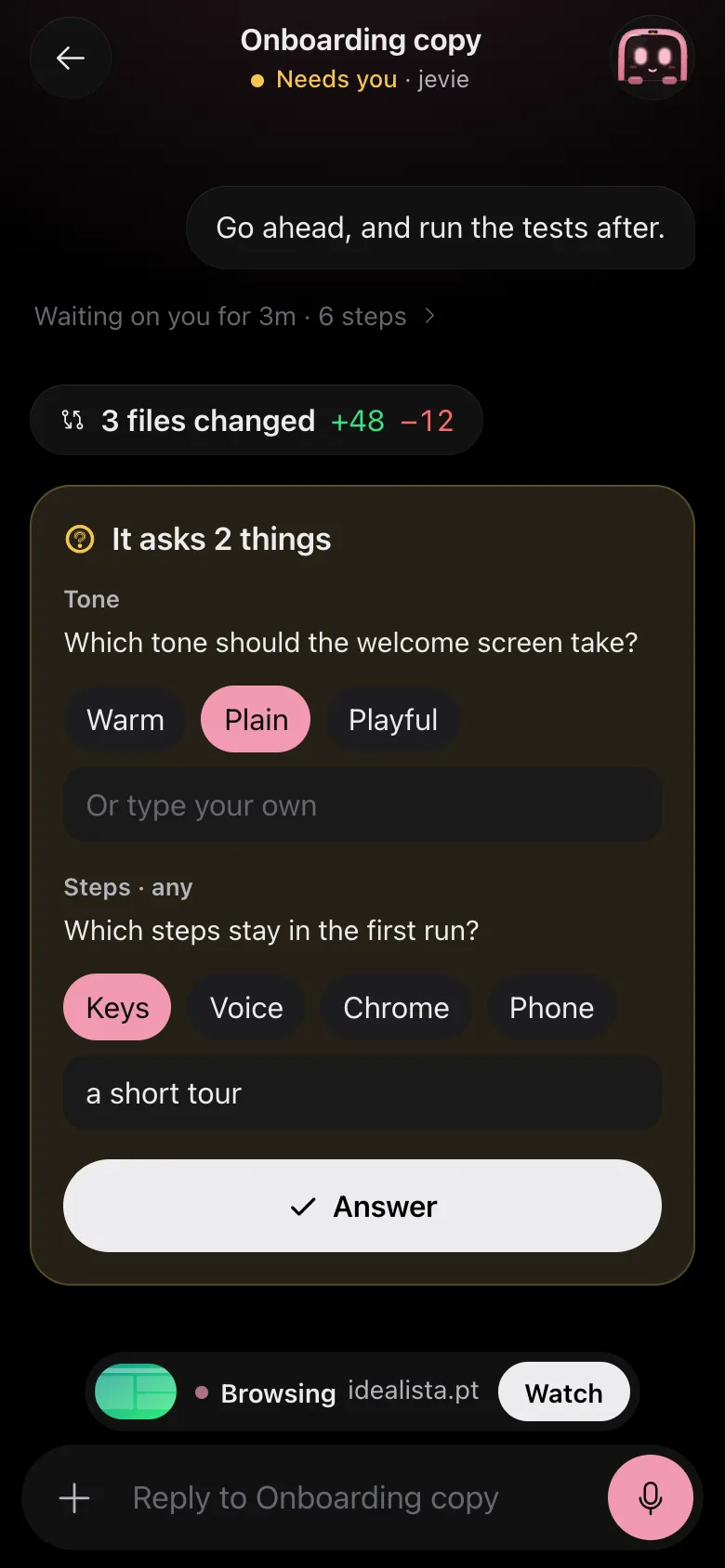
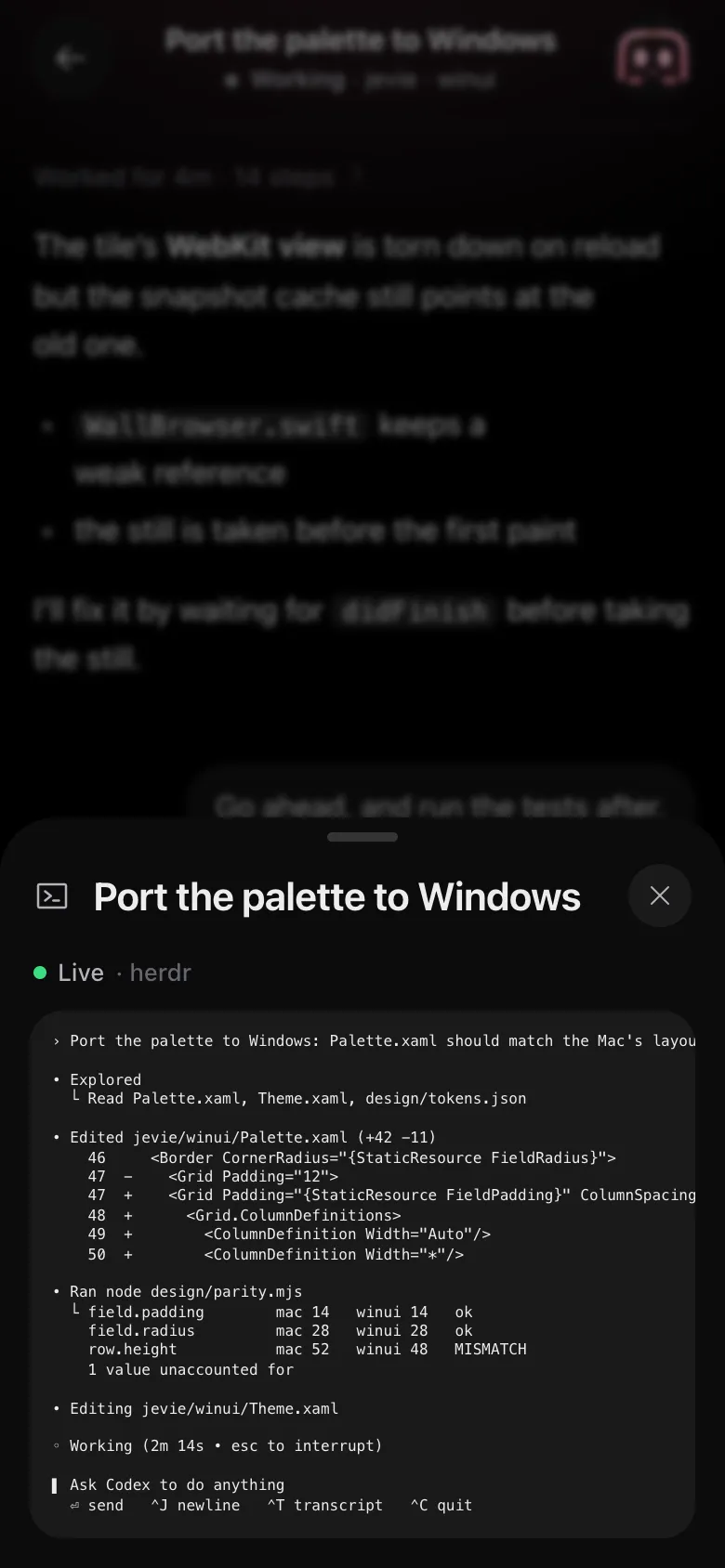
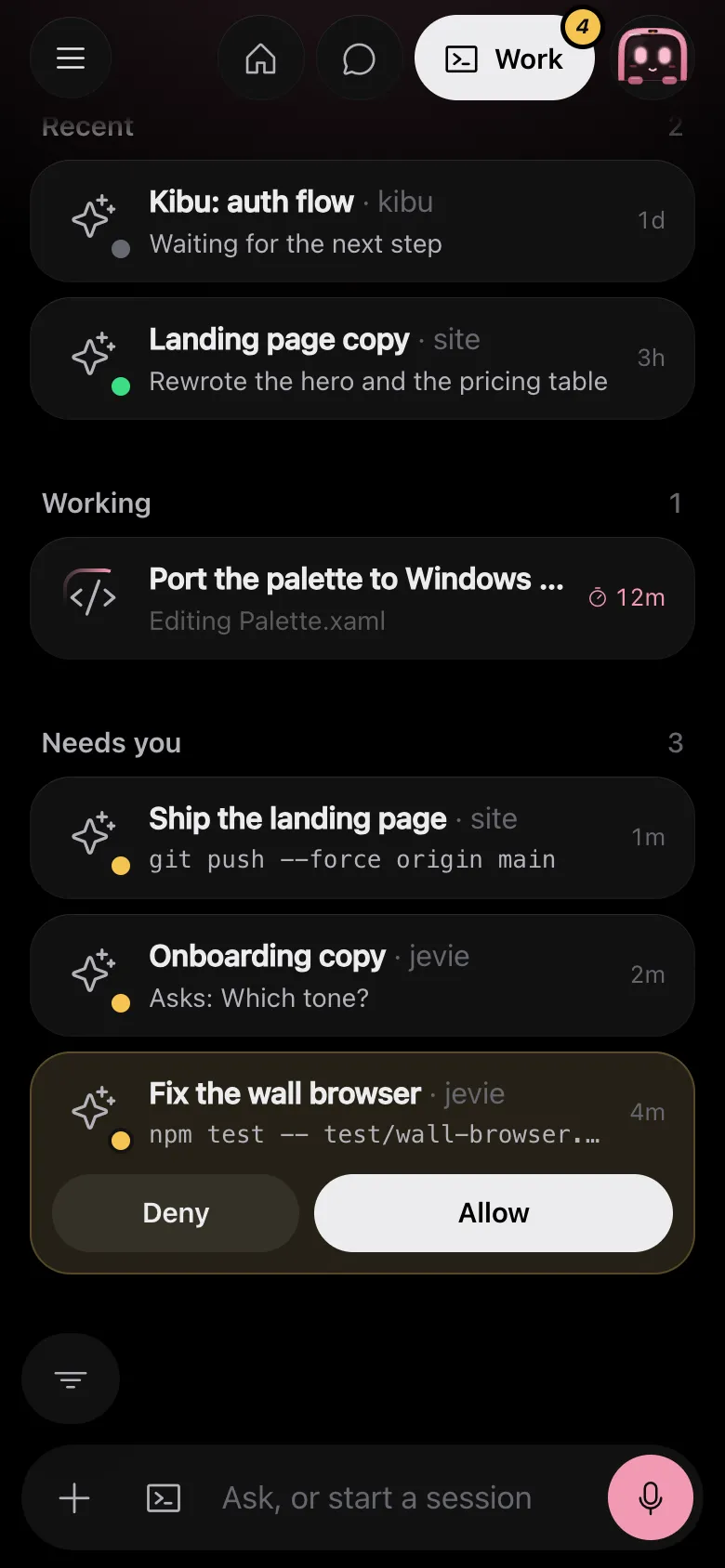
Drawn by Jevie's own renderer with made-up data.
In Jevie, help session
answers from this page as you type.
Related
Updated 9 November 2026 · Something wrong or missing? Tell us