 jevieDocs
Download
Everywhere
Jevie on your phone and on Windows
Your Mac's Jevie in your pocket after one QR scan, answers even when the Mac sleeps, and the same palette on Windows.
Free, more with ProMacWindowsPhone
What it looks likeUse itHow it worksLimitsWhere it's kept
Use it
Pair
pair my phone
connect my iphone
A QR code on the Mac; scan it and Jevie is on your phonemy phones
unpair my phone
forget phone 4f2a
What is paired, and unpairingsign out of jevie's tailscale
Jevie's own Tailscale signed out and phone access off; your own Tailscale app is never touched- a Mac and a PC linked (
link a computer
on one,link to …
with its code on the other)Pick either under Computers in the gear, and Ask and Work go to that one - the first time the app opens: a valley at dawn that brightens page by page.
Jevie, mon ami.
, with Jevie on the hill (tap him; First Light's music starts from your first press, Music at the top turns it off), then a short show of films of the real palette over the valley: Ask, Apps, Files, Reminders, Answers and your agents on the phone's own Work place, each with a Next that never waits and a Try it that asks its sentence for real (with no Mac paired, only what Jevie Cloud can answer is offered). Then Pair with your Mac (saypair my phone
on the Mac and scan its code, try a demo Mac, or Not now; a paired phone sees it done), your accounts once paired, your plan, andYou're set
. Back is on every page but the first; Later is asked once more, never after a second; Skip passes the intro before it. Sayshow me around
to see it again
Your agents, from anywhere
- WorkEvery session on a board, list, titles (a dot and a name a row, as the unfolded phone's narrowed list) or wall of live miniatures, picked by the icons beside the filters; tap one to reply
- two fingers apart on a chat or an answerIts words larger, together smaller (60 to 200%, the Mac's ⌘+ steps and two smaller); together at 60% goes back to the wall of chats; two fingers tapped twice, or
normal text
, put it back;bigger text
·smaller text
and a keyboard's ⌘ or Ctrl with + − 0 do the same - each place's own paneSwipe right from the left edge, or tap the menu button: on Ask your memory by month, each day with its screens; on Work your sessions as a list, whatever Work's own layout, even from inside a session; on Team its spaces, threads, agents and people, as a sidebar (a row a line, read ones quiet, new ones bold); pick one and the pane goes. Swiping right anywhere else in a session or conversation still goes back
- on a Fold or a tabletThe list stays beside the session; from about 880 points wide (a Fold unfolded), tap a second session and both are open side by side, the field under the one you tap; × hides a pane, the session keeps running
- swipe the list left on a Fold or a tabletWork's sessions or Team's spaces and people go away and the session or room takes the width; swipe right from the left edge (or tap the menu button) and the list comes back
- the browser on a Fold or a tabletTap the globe in Work's list and the session's pane becomes the browser: an address bar on top, Google.com or any address or search opens there and fills the pane, live from the Mac; every open page is a tab in the list under the globe, the one shown ringed; × closes the pane, a session tapped takes it back, and folding the phone keeps the page full screen
- swipe a session left in WorkIt goes to Team with its name, agent, folder and where it stands waiting unsent in the field: @ a teammate and send; to close a session, hold it and tap Close
- Allow or DenyAn agent's request, from its card or straight from the notification
- swipe words right on AskA little way and they wait unsent in Team's field, to @ a teammate; further and the label turns to the agent: let go and they go to a coding agent in its folder as its task (Team sits between Ask and Work, so the swipe passes it on the way); anything else swiped right a little way goes to Team the same, and further (a file, a page, a note, a contact, a suggestion, a row of an answer) instead opens a new session of that agent with it waiting unsent in the field, for you to ask about it and send; a suggestion swiped left hides, the card saying which before you let go
- the buttons at the top rightStacked as cards, the place you are on in front and the rest peeking out to its left, so the page keeps its width; a place waiting on you shows a dot on its card's edge (the one in front keeps its number); tap the stack and it fans out into Home, Ask, Team, Work and the gear; pick one, or tap anywhere else, and it stacks again; swiping the page left or right still turns between places; on a Fold or a tablet, Team's room puts its name, who is here and its buttons in that same top row beside the stack, and the fanned buttons cover them until they stack again
- Live Activity (iPhone)How many agents are at work, on the lock screen
google month lisbon
open booking.com
The page opens on the Mac and shows live; tap to use itopen Calculator on my Mac
The app opens on your Mac from your phone; just after pairing, the phone offers one to try
Your day
- HomeYour day, to-dos, notes and pinned answers, in the order you arrange
- Pin to HomeAn answer or a live card kept, refreshed when it goes stale
- the rows on AskWhat needs you now, from your mail, sessions, repositories, pull requests and what you follow; tap one to act on it, swipe it left for
not now
(it can come back in about eight hours) - a notification for the one thing that can't waitMoney due, a deadline today, someone waiting — at most one every two hours
draft a reply to Ann
on a row about her mailThe reply was already written while you were away; sending still asks you- scroll up on AskEverything you asked, from every device, day by day; the strip on the right edge is your memory's timeline: each month named where it starts, and a finger on a day shows what was done that day, how much was asked and a strip of its screens; let go and Ask opens at that day
- the microphoneLive dictation; Jev answers aloud in its own voice
- share sheet → Jevie (iPhone)Ask about any page, link or text
Settings
- the gear → ConnectionsWhat is connected, everything else found by name; a tap opens the sign-in on your Mac
- the gear → UsageClaude's and Codex's plan windows (five hours, the week), how full and when each resets; Gemini CLI, OpenCode and pi's last seven days (replies, tokens, cost where the agent records it), since they spend a key rather than a plan; and your Jevie Cloud plan
- the gear → ExtensionsInstalled first, then the store; tap to install or update on your Mac, or the bin beside an installed one, then Remove, to uninstall it
- the gear → TabsSwitch Home, Ask, Team or Work off and it leaves the top's stack and the swipe (Work alone, say); one always stays on. The app opens on the tab you left it on
- the gear → Read answers aloudOff, a question asked by voice is answered on screen only
- the gear → Hold Jev to dictateOff, holding Jev does nothing and a tap still talks
- the gear → Spoken languageThe language answers are spoken in; hearing you needs no setting
- the gear → Show the welcome again · Send feedback
Without your Mac
weather in Lisbon tomorrow
who won the last F1 race
Looked up on the web, with sourcescompare iPhone 17 Pro vs Pixel 10 Pro
Drawn as a table, checklist or charttodo buy milk
remind me to call mom friday at 6pm
Written down on the phone, rings even offline- + → a photo,
is this ripe?
Asked about the picture - no signalThe question is kept and asked when you are back online
Windows
- Alt+SpaceThe same palette, with Alt where the Mac says ⌘
notepad
wallpaper
environment variables
Apps, Settings pages and Control Panel tasksopen terminal as administrator
Started elevated after Windows asks
How it works
Your phone reaches your Mac over a private network only your own devices can join: Tailscale, with a free account. Jevie brings its own Tailscale for the Mac (sign it in once; a Tailscale app already on the Mac is used instead), the phone needs the Tailscale app signed in to the same account, and the tailnet needs HTTPS turned on, once, in Tailscale's admin page (Jevie shows the link). When the Mac is asleep or out of reach (its internet down too), the phone app opens within a few seconds and answers through Jevie Cloud, and syncs to-dos and memory back when the Mac returns.
On Windows, the same Jevie runs behind a native palette.
Limits
- Phone pairing comes with Care and the free week (plans); without a Mac, Free is 10,000 credits a month.
- Pairing needs Tailscale on the phone and HTTPS on for the tailnet; Jevie cannot turn either on for you.
- Without a Mac, the app answers questions and keeps to-dos and notes; apps, files, sessions and the browser stay the Mac's.
- Questions asked without a Mac go to Jevie Cloud, which keeps nothing; to-dos and notes stay on the phone.
- Text size is this phone's alone and sizes the words of chats and answers, not the bar, the tabs or the field.
- Side by side is Work's list only (not its board, titles, wall or chain), two sessions at most.
- The app is not in the App Store or Google Play yet: on Android, jevie.ai's Download button gives the .apk once one is published, with the steps to install it; on Windows, acting inside other apps is not built yet.
Where it's kept
Paired phones in ~/.jevie; the always-on access is the launch agent com.jevie.tunnel.
What it looks like
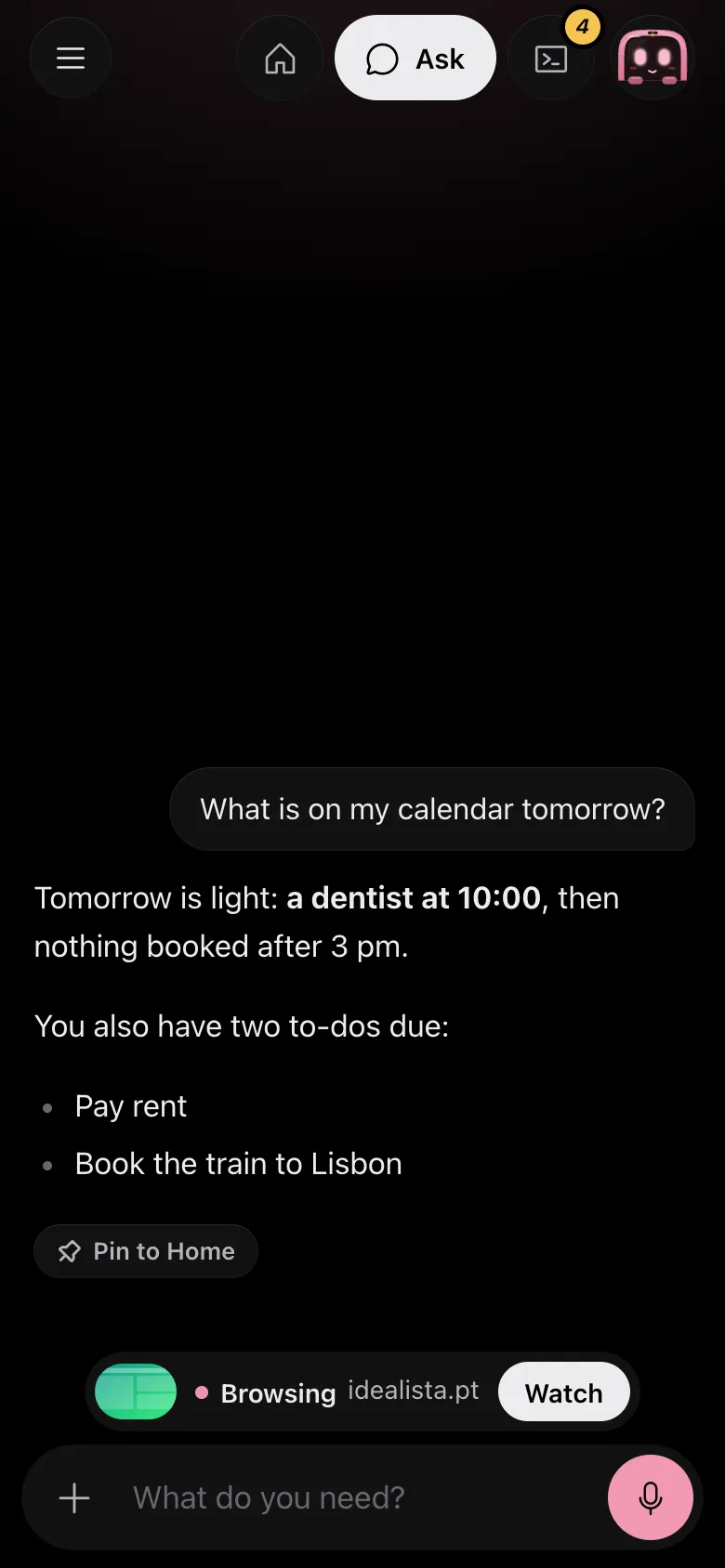
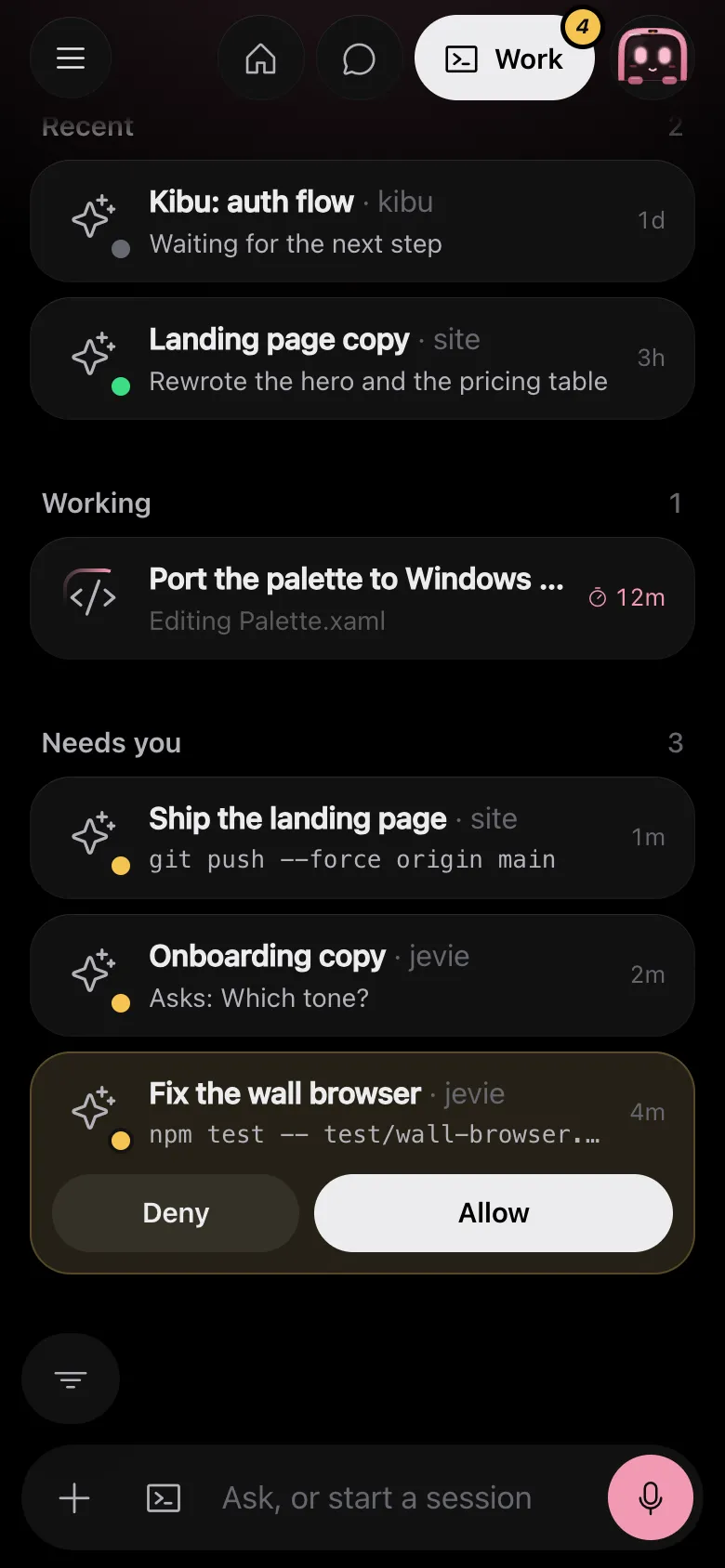
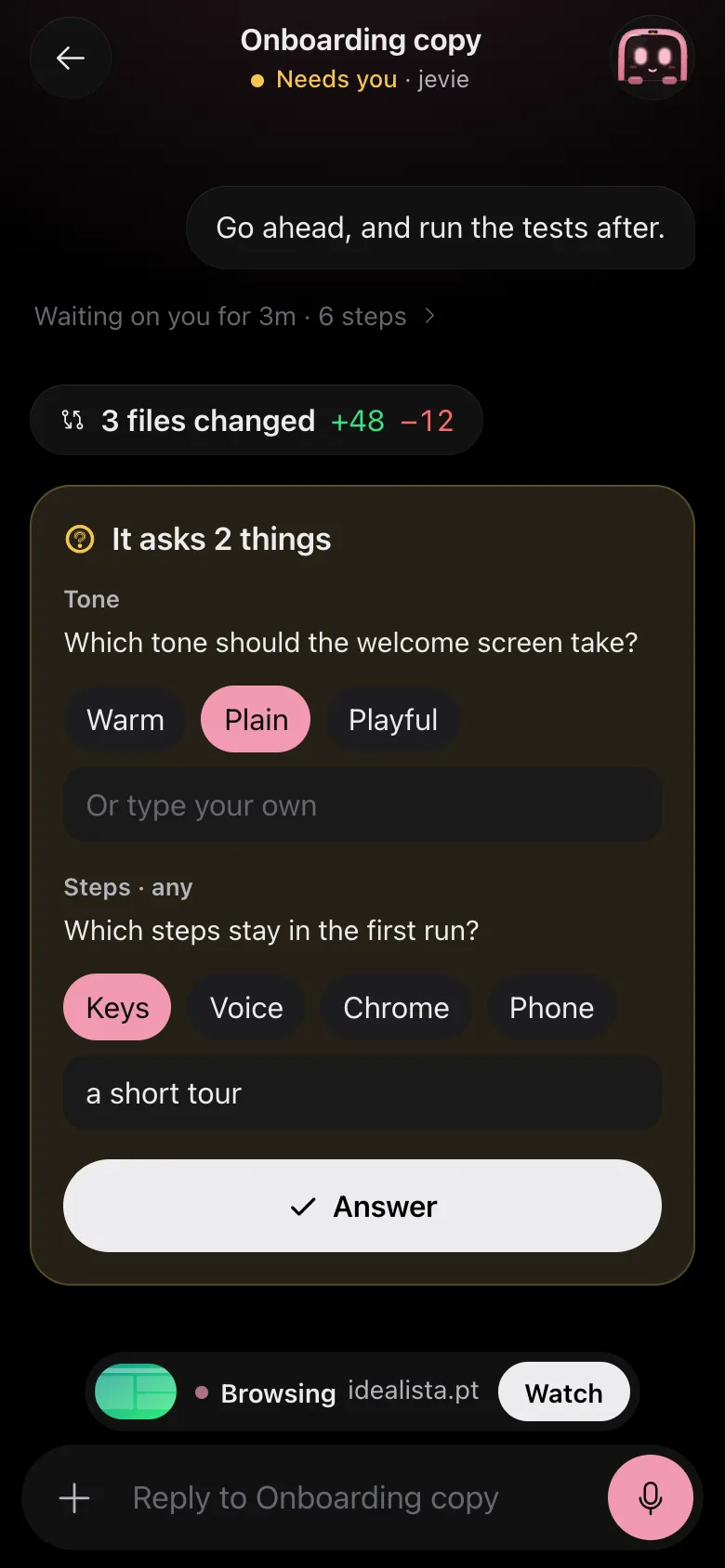
Drawn by Jevie's own renderer with made-up data.
In Jevie, help phone
answers from this page as you type.
Related
Updated 6 November 2026 · Something wrong or missing? Tell us