 jevieDocs
Download
Make it yours
Approvals
Let Jevie and your agents work freely while you stay in charge: anything that changes, sends or deletes asks you first, unless you said it may.
FreeMacPhone
Choose an example to copy it, then try it in Jevie.
What it looks likeUse itHow it worksLimitsWhere it's kept
Use it
- a card asks
Run … in …?
Yes
once,always
for that command in that folder,no
, ornever
yes
always
no
never
The same answers, said or typedsend it
A yes to a card that sends something out (never to one that runs a command)no, keep them
yes but keep Spotify open
Answered in your own words; a change asks again- a card that says
This cannot be undone
Onlyyes
oralways
runs it - a long task or automation that needed youIt waits, naming the exact command
- an agent's question on its session (
Keep old sign-ins for 30 days?
)Tap an option, tick the steps you did, or fill in what it asked, on the phone or the Mac - ⌘1–⌘4 on a session row that asksThat option, sent to the agent
How it works
A command that only reads runs at once, inside a fence that keeps it away from your keys, private files and the network. Anything that changes something, reaches past this Mac or sends something out is a card for your yes; with nobody there to answer, the answer is no.
When a coding agent asks to run a command or edit a file, you see the real command and how risky it is, in the palette and on your phone. Always allow
is kept per kind of ask and folder in a file you can edit; something that cannot be undone is never offered Always
and needs you to hold Allow.
When an agent asks you
A coding agent with Jevie's tools can ask you something without stopping: a decision it should not make alone, a step only you can do (add a secret, change a setting), a few facts it cannot find, or something ready for you to look at. It goes on with whatever does not depend on the answer, and its session shows the question until you answer. Your phone is told, the session's card shows the options (the agent's pick marked Recommended), and the Mac's session row offers them on ⌘1–⌘4.
Your answer reaches that same session as one message, typed in when it can take it, and is tried again when its turn ends if it could not. Only you answer: an agent never answers its own question or another's. It never asks for a secret in a field; it asks you to put it in place yourself.
A sentence arriving from a link or a button in an answer is put in the field first, so you always see what runs.
Putting the Mac to sleep, locking it, quitting apps, closing tabs and deleting run unasked only when your words say exactly that. If Jevie arrived at one any other way (rewording your sentence, a close call, or its fallback reading a word in it), it asks Put the Mac to sleep?
or Quit Finder, Notes and Safari?
and waits for your yes.
Limits
- Sending, publishing and deploying always need a yes for that exact command, or a folder you trusted in full.
- An
always
covers only that exact command and folder. - On the phone, low-risk asks can be allowed from the lock screen; riskier ones open Jevie to allow.
- The mode (deny, ask, auto, full) is set in the approvals file; there is no sentence for it yet.
- An agent's question reaches you only from Claude Code, Codex and the other agents running on this Mac with Jevie's tools; one Jevie cannot place among its sessions is told to ask in its reply instead.
- A question whose session ended is let go two minutes later, and one nobody answered after seven days.
- A question with several fields, or steps to tick, is answered on the phone's card; the Mac's row answers one choice.
Where it's kept
~/.jevie/approvals.json; agents' rules in ~/.jevie/self/approvals.md.
What it looks like
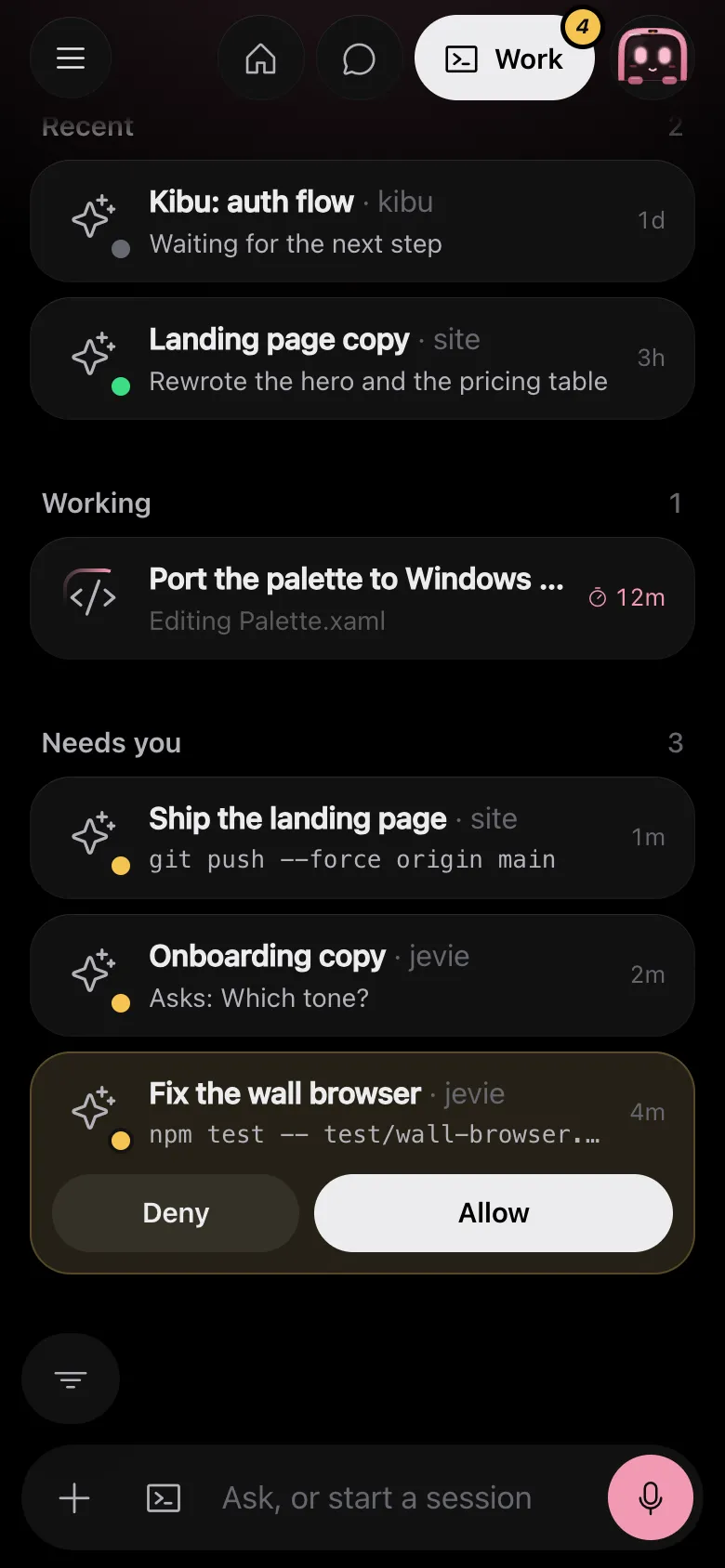
Drawn by Jevie's own renderer with made-up data.
In Jevie, help approval
answers from this page as you type.
Related
Updated 6 November 2026 · Something wrong or missing? Tell us