 jevieDocs
Download
Answers
Markets
Any stock or coin live as you type: compare several on one chart, see the day's movers, and learn why something moved.
Free, more with ProMacWindows
What it looks likeUse itHow it worksLimitsWhere it's kept
Use it
Prices and charts
aapl
$nvda
bitcoin
The price, the move and the day's line, live while shown; before the open, the last close (closed at $343.91 yesterday
) and the pre-market pricetsla 1y
how's msft over 1 year
how did nvda do in the last 6 months
The stock over that spanAAPL vs MSFT vs NVDA
apple vs microsoft
Every one on one chart, in percentmy stocks today
tech stocks today
Your watchlist, or a set you savedpre-market
Your watchlist before the open
What is moving
biggest movers
top gainers
what's moving
The market's movers, heaviest volume firstmovers in my tech stocks
The movers of a set you savedwhy did META jump
why is NVDA down today
The day's stories pinned on its chartmy stocks with rvol
my stocks with next earnings
A list with the columns you namealert me when AAPL crosses 180
A watch (see market watches)
Your holdings
I bought 10 AAPL at 182.50
sold all my TSLA
Shown first, ↵ keeps itmy portfolio
how are my holdings doing
What it is worth, today and since you bought
How it works
Type a ticker, a cashtag, a coin or a well-known company and the card appears under the field, updating while it is on screen. Several symbols share one chart so you can see who led the day; tap one to bring it forward.
Why did it move
lines the day's stories up with the chart, so you can see which headline came before the jump. Pin a market card to a desk and every market tile there follows the ticker you press.
Limits
- Prices can trail by about a minute; movers are US stocks only.
- Company names work for the best-known companies; others by ticker.
- A move with no story says so rather than guessing.
- Prices and news come from Yahoo (stocks) and Coinbase (coins); your holdings stay on your Mac.
Where it's kept
Your holdings in ~/.jevie/self/holdings.md (kernel/market/holdings.mjs), your watchlist in ~/.jevie/stocks.json, saved sets in ~/.jevie/stock-sets.json.
What it looks like
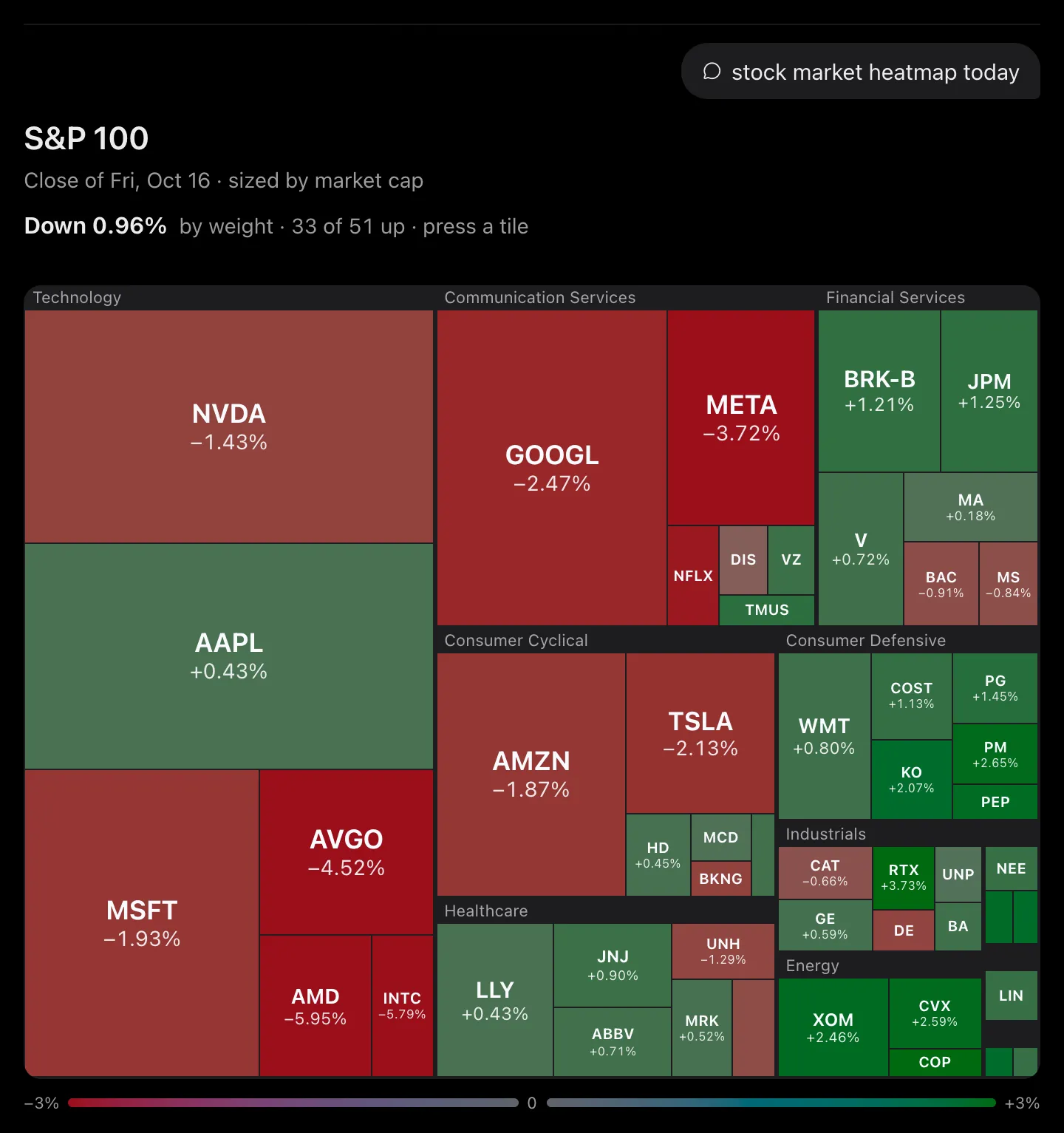
stock market heatmap today
Drawn by Jevie's own renderer with made-up data.
In Jevie, help stock card
answers from this page as you type.
Related
Updated 29 October 2026 · Something wrong or missing? Tell us